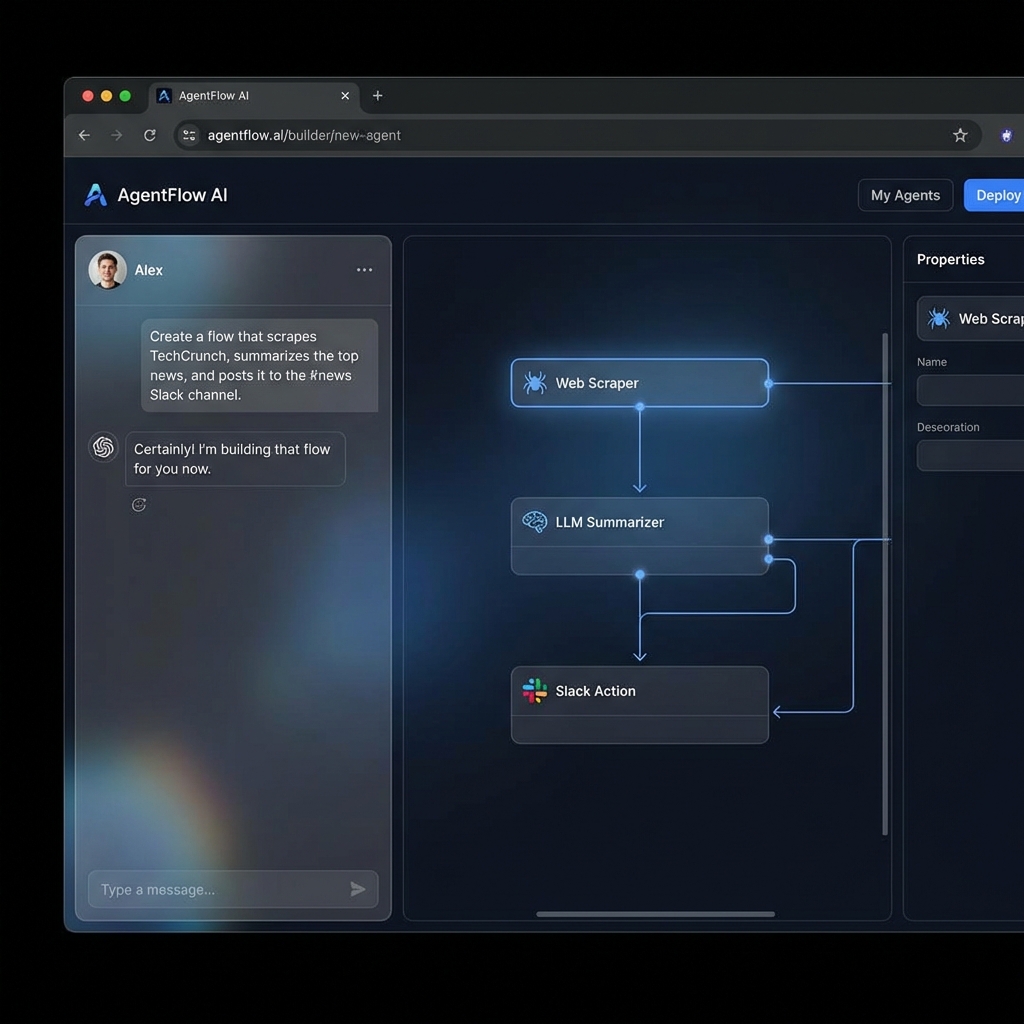
AI Builder Assistant
The AI Builder Assistant is a unique feature of the RealTimeX Agent Builder that allows you to create and modify complex agents through natural language conversation. Instead of manually dragging and connecting every block, you can simply describe what you want the agent to do.
How it Works
The assistant is integrated directly into the Agent Builder's left side panel. It has a real-time connection to the canvas and can perform actions on your behalf.
1. Generating a Flow from Scratch
When you open a new flow, the assistant will ask you what you'd like to build.
- Example: "Build me an agent that scrapes HackerNews for top stories about AI and sends a summary to my Slack."
- Result: The assistant will automatically populate the canvas with the necessary blocks (Web Scraper, LLM Instruction, MCP Slack Action) and connect them logically.
2. Modifying Existing Flows
You can ask the assistant to tweak your current setup.
- Example: "Add a conditional block to only send the summary if there are more than 5 results."
- Example: "Change the LLM prompt to be more concise."
3. Debugging and Optimization
If your flow isn't working as expected, the assistant can help identify gaps.
- Example: "Why is my $api_response variable returning undefined?"
- Answer: The assistant will check your block configurations and suggest the correct JSON path.
Why use the AI Assistant?
- Speed: Build complex multi-step workflows in seconds.
- Accessibility: No need to memorize every block type and variable syntax.
- Iterative Design: Quickly prototype ideas and refine them through conversation.
Better Prompts = Better Agents: Be specific about your inputs and outputs. Mention the variable names you want to use for better organization.
Interactive Roadmap
The assistant keeps a "Plan" or "Todo" list of the changes it is making. You can see these steps in the chat timeline, and you can undo any action if the result isn't what you intended.